
Starting October 1, 2026, Roamer AI builds websites differently. It used to pick one of a few fixed templates and fill in your content, so many of the sites it made looked a little alike. Now it uses free design: it listens to how you describe the feel you want, then designs the layout, colors and a signature visual motif for your brand from scratch.
This update is included in WP × Roamer AI Pro. If you're already on Pro, there's nothing to set up. Just open Roamer AI and start using it.
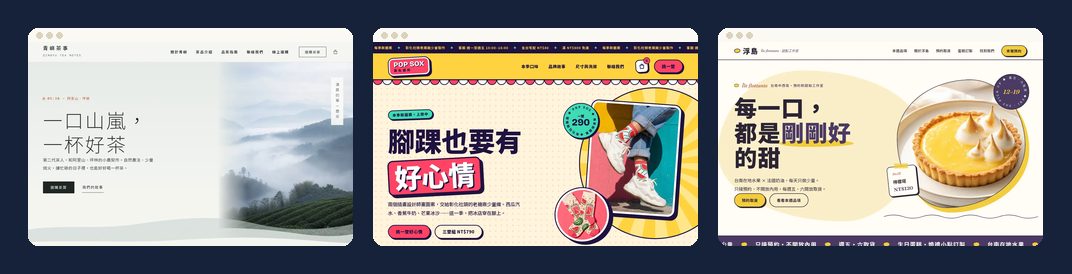
One AI, completely different websites
To make sure free design really produces different results, we used the same Roamer AI to build a website for each of three shops with completely different styles. Each one started from a blank WordPress site and was built one message at a time, and the full conversations are published on the demo pages.
Qingyu Tea: calm and airy
The opening description was: "I want it to feel like brewing the first pot of tea on a mountain at dawn: quiet, airy, with layers of mist. Nothing like the red-and-gold gift boxes of traditional tea shops." Roamer AI came up with a style called "Morning Mist Notes": mist white and ink with a touch of dawn orange, a notebook-style timestamp at the start of every section, and mountain ridges in slowly drifting layers of mist across the header and footer. Going from a blank site to ready to sell took 15 messages in all. See the full conversation
POP SOX: bold color pop
This shop asked for the exact opposite: "Go bold with color, like a summer shaved-ice shop sign and street stickers. Loud colors are fine, but it still has to be easy to read and easy to buy from. No minimalism, nothing gray." Roamer AI came up with "Ice-shop sign meets sticker wall": watermelon red, banana yellow and mango orange, thick outlines with hard shadows, and stickers deliberately stuck on at a tilt that snap straight when your mouse passes over them. It took just 8 messages to build an online store. See the full conversation
Fudao Patisserie: a home page from one message
The third shop had nothing prepared and only said: "Build the home page first, with the header menu and footer. No logo, you pick the style. If the plan looks good to you, just go ahead." Roamer AI found a signature motif in the shop's name: Fudao means "floating island," which is also a French dessert (Île flottante). The dessert photos are cropped into little floating islands, items are numbered starting from No.01, and the palette comes from lemon curd, custard and Earl Grey. See the full conversation
Three tips for a site that feels like yours
Describe the feel with one scene. "Like brewing tea on a mountain at dawn" works far better than "make it simple." Mention what you don't want, too, and the AI will find the right direction faster.
Start with the home page, then keep going if you like it. Once you've seen the home page and you're happy with it, say "build the other pages in the same style," and the whole site will look more consistent.
Want a new look? Say "redesign." When you're only adding a page or changing a section, Roamer AI keeps your site's current design and won't replace the whole site on its own.
Sites you've already built won't be changed
This update only changes how Roamer AI creates new designs. When you add pages or change sections on an existing site, Roamer AI keeps the original design. If you want a new style, just tell it "redesign my site." Designing a full page takes about 10 to 15 minutes, and giving it your images, copy and business details all at once saves the most time. Roamer AI takes a snapshot before every change, so if you're not happy with something, you can say "undo" at any time.
How to get started
If you're on WordPress Basic, open your site under "My Projects" and click "Upgrade to Pro." It takes effect as soon as you pay. Basic also comes with a few conversations each month, so you can try it out first. If you don't have a WordPress site yet, just start a Pro site, and your hosting, website and Roamer AI will be set up together.
See WP × Roamer AI plans and pricing Is AI Safe on Your Site? Snapshots, Confirmations and Undo
