
 Roamer AI






 WP × Roamer AI · Managed WordPress + AI site builder
You bring the idea
Roamer AI builds it
Not a designer? Doesn't matter. Tell Roamer AI "build me a website for my coffee shop" and it logs in, builds the home page, menus and forms, then sends you screenshots of what it did.
Hosting + website + Roamer AI, all in one · avg. NT$999/mo (NT$11,988/yr, billed yearly)
Just want the site without the AI? Basic runs avg. NT$299/mo (NT$3,588 billed yearly) · cancel renewal anytime · export the whole site whenever you like · request a free trial
60sec. to launch
1container per site
0cancellation fees
Try a command
Pick one and watch Roamer AI change this site
Interactive demo · ROAMER CAFÉ is a fictional sample site; all content and images are sample data
Full demos · every prompt included
Three real conversations:
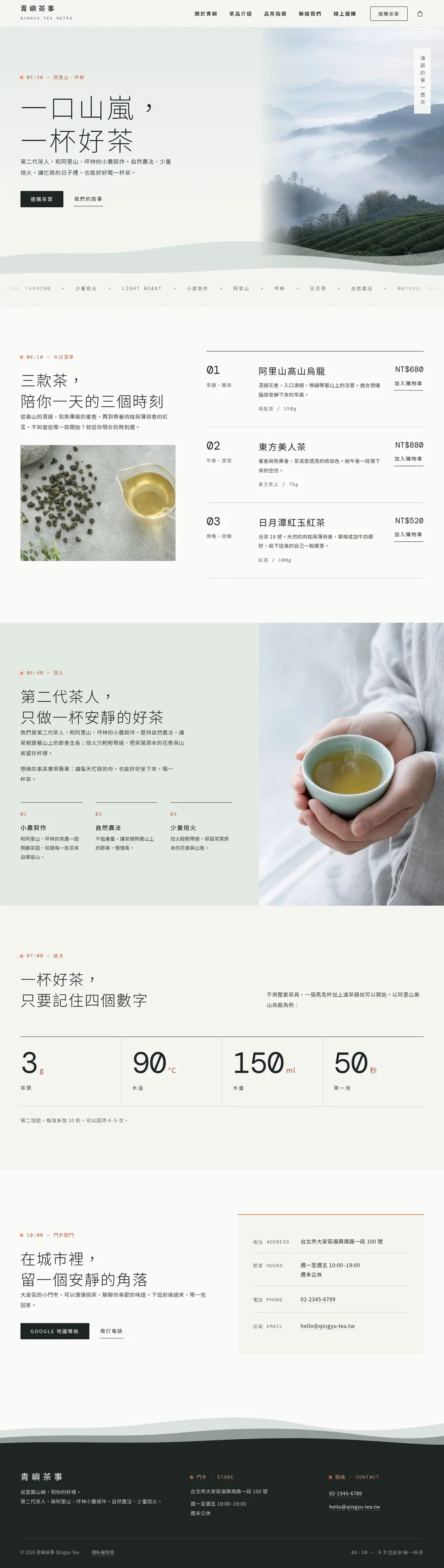
See the full Qingyu Tea demo
See the full POP SOX demo
See the full Fudao Patisserie demo
Three real conversations:
one AI, three completely different websites
Describe the feel you want and Roamer AI designs the site from scratch. Every prompt, everything the AI did and every result, in order. Copy the prompts and reuse them.
Member sites · Made with Roamer AI
Sites members built
together with Roamer AI
No code, no designer. Just say what you want in plain language.
Roamer AI goes into your site to build pages, lay them out and generate images.


Roamer AI built in · included with your plan
No design skills, no time?
No design skills, no time?
Just tell Roamer AI what you want
Roamer AI isn't a chatbot that answers questions — it logs into your WordPress and does the work: builds pages, writes the copy, generates images, sets up menus, headers and footers, adds contact forms and fills in your SEO. It screenshots every change to check its own work, and one "undo" rolls it back.
In this video: no one to call, a quote for every small edit, afraid to hit Update → edit your site by chat → back up, then update in batches → diagnose and fix a white screen → four safeguards: snapshots, confirmation codes, undo, and a human engineer.
-
1
Connect your site
Hit "Connect site" in the Roamer AI sidebar. One click, no passwords to paste.
-
2
Say what you need
"Build a site for my beachfront B&B — home, rooms, directions, contact. Here's the address and phone number." It lays out a plan for you to approve, then gets to work.
-
3
Review, tweak, publish
It sends you desktop and mobile screenshots when it's done. "Change the headline to..." or "make the button gold" takes seconds, and every step can be undone.
Full site build
New & edited pages
Site-wide header/footer
Navigation menus
AI images & media library
Contact forms
SEO titles & descriptions
WooCommerce products
Plugin installs & debugging
Plugin conflict checks
Bulk updates
Custom features
Health checks & rollback
Build the site for Roamer Coffee: home, menu, store info, contact. Address is 8 Roamer Rd, Da'an District, Taipei; phone 02-2345-6789. Send me screenshots when you're done.
R

Set site name & brand colors
Built header and footer
Generated 4 coffee shop photos
Assembled 4 pages
Added a contact form
Checked desktop & mobile
All four pages are live, the site-wide header, footer and menu are done, and I checked the desktop and mobile screenshots — the layout looks right.
Home page screenshot · desktop / mobile
Tell me what to change, or say "undo" to roll back.
Change the home page headline to "Roamer Coffee — a cup by the sea"
R
Done — I only touched that one line, and the screenshot confirms nothing else shifted.
Snapshot before every change · automatic rollback on failure
See the full demo: an online store in 15 prompts
After launch · day-to-day upkeep
Launching is the easy part —
Launching is the easy part —
let Roamer AI handle the upkeep too
A plugin update breaks the site, you get a white screen, forms stop sending, you want a small feature no plugin covers. All the things you used to hire a developer for, you can now just ask Roamer AI to do. It backs up first, checks its work afterward, and rolls back automatically if something goes wrong.
Routine health checks
"Take a look at my site." The AI reviews WordPress, plugin and theme updates plus the error logs, then tells you what needs attention and whether it should act.
You just say: "Check my site — anything to update, any errors?"
Plugin settings & debugging
Forms not sending, caching not kicking in, SEO settings not applying: the AI reads the plugin config and the error logs, finds the cause and fixes it.
You just say: "Nobody gets the contact form emails. Find the plugin causing it and fix it."
Find plugin conflicts
When the site slows down or a feature suddenly breaks, the AI disables suspects one at a time, re-tests, finds the pair that clash and explains the trade-off.
You just say: "Checkout broke after the last update — find the plugin conflict."
Bulk updates, verified
Update every plugin and theme at once: backup first, then an automatic check of the home page and admin. Any error or conflict rolls straight back.
You just say: "Update all plugins. Back up first and confirm the site still works after."
Build custom features
No plugin fits? The AI can write the snippet or the custom styling itself: booking buttons, members-only content, automatic price calculations, LINE notifications.
You just say: "Add a feature: send me a LINE notification whenever a post is published."
White screens & rescues
Site loads blank, admin locked out: the AI reads the error log, finds the culprit, disables the bad plugin or restores the latest snapshot. Back online in minutes.
You just say: "My site loads as a blank white page. Find out why and fix it."
Hosting + website + AI, all in for avg. NT$999/mo (billed yearly) on Pro: no server to set up, no site to build yourself, and an AI that edits and maintains it for you. Basic (avg. NT$299/mo, NT$3,588 billed yearly) covers the WordPress site plus a starter AI allowance. Compare the plans
WordPress × Roamer AI
Why WordPress,
Why WordPress,
instead of “just generating a site”?
A one-click AI site looks great on day one. But then what? A website keeps changing and growing. Roamer AI builds yours on WordPress, so generating it is only the start and every day after is easy to maintain.
Two approaches, and where they differ after launch
| Pure AI site builder | WP × Roamer AI | |
|---|---|---|
| Edit a sentence | Regenerate the page | Edit it in the admin |
| Add booking, payments | Only if the tool has it | Install a plugin |
| Your data | Locked in the platform | Export it anytime |
| Something breaks | Regenerate and hope | One-click snapshot restore |
An admin you can use yourself
Swap a photo, change a price, add an article: log in to the WordPress admin and do it. No regenerating the whole site, no developer needed.
60,000 plugins, nothing built from scratch
Forms, online payments, booking, multilingual, SEO, memberships: plugins written by others and proven on millions of sites, ready to install.
The site is yours and it moves with you
WordPress is open source and runs four in ten websites worldwide. Export the whole site and its data to any host; nothing is locked inside a generator.
AI can get in, and so can you
Roamer AI builds pages and reworks layouts inside your WordPress; you can take over by hand anytime. Every step is snapshotted, so a bad change is one click to undo.

Fully managed · you just write
We handle the annoying parts of running a site
No cPanel to learn, no database to touch. RoamerHost installs the latest WordPress for you, one site per isolated container.
Your time belongs to your content, not your server.
Automatic install
Pay, and your site is already installed
No server specs to choose, no setup wizard to click through, no database to configure. The moment your subscription goes through, the latest WordPress is installed — admin language, time zone and SSL certificate all set.
- Always the latest stable release
- Security updates applied automatically
- Isolated container — no sharing with other sites
Pick a plan and pay
Card, billed yearly, cancel renewal anytime
WordPress installs itself
Latest version + admin + SSL, automatic
3
One-click login, start writing
Get your URL and credentials, go straight in
About 60 seconds start to finish
My WordPress site
● Running
Log in to WordPress
Reset password
Manage plugins
RoamerHost dashboard — no credentials to remember, one click gets you in
One-click login
Forgot your password? Not a thing here
Click "Log in to WordPress" in the dashboard and you land in wp-admin without typing anything. If you really do lose the password, there's no email round trip either — reset it from the dashboard and the new one works immediately.
- Secure one-time login links that expire in 60 seconds
- Manage and update plugins and themes from the dashboard
- Multilingual admin, simple enough for anyone on your team
Your own domain
Use your brand's domain — we handle the SSL
Bought your domain at GoDaddy, Gandi or anywhere else? Enter it in the dashboard and follow the DNS instructions. The moment it verifies, the SSL certificate is issued, every internal link switches over and the old address redirects. You never see a config file.
- Free SSL certificate, auto-renewed forever
- No domain yet? You get a free subdomain to use right away
random123.roamerhost.com
yourbrand.com
SSL ✓
Enter the domain → set the DNS → hit verify. Done.
WooCommerce
Open your own online store
Yoast SEO
Help Google find you
UpdraftPlus
Site backups and restores
Tens of thousands of free plugins, from the dashboard or wp-admin
Plugin freedom
Tens of thousands of plugins, install what you want
The plugin ecosystem is what makes WordPress worth using: WooCommerce for your store, SEO tools, contact forms, membership systems, backup utilities. Whatever you need, there's a plugin. This is a complete, standalone WordPress with no install restrictions.
- Any plugin, any theme — including what WordPress.com won't allow
- Activate, deactivate and update from the dashboard, without opening wp-admin
DIY vs. fully managed
"Can't I just rent shared hosting and install it?"
If you can get it running — sure
The hard way
DIY on shared hosting
Learn cPanel, FTP and databases first
Create a database, upload files, run the installer, edit wp-config… there goes your first evening.
Hundreds of sites crammed onto one box
When the site next door gets a traffic spike or an attack, yours slows down and goes with it.
SSL and a dedicated IP are usually add-ons
The base price looks cheap. Add SSL, add resources, and it stops being cheap.
When it breaks, you file a ticket and wait
White screen, malware, a failed update — days of back and forth while your site stays down.
Real cost
Hosting fees + countless evenings
The smart way
Fully managed by RoamerHost
Installed automatically in 60 seconds
Your site is online as soon as payment clears — you never press "install".
Isolated container, no noisy neighbors
Its own container and dedicated compute, fully isolated from other customers.
SSL and security updates included
Free SSL plus automatic security updates — in the plan, no hidden add-ons.
Friendly admin + Taiwan-based support
Dashboard and admin in your language, and a real person to ask.
Monthly average
from NT$299
From NT$3,588/yr, billed yearly · hosting + SSL + upkeep included, cancel renewal anytime
Spend your time running the site, not repairing it. That's the smart choice.
Who it's for
Check this list before you read any further
RoamerHost isn't for everyone. If you're on the left, it'll save you a lot of evenings. If you're on the right, we'll honestly tell you to look elsewhere.
A good fit if
- It's your first site — a blog, a personal brand or a portfolio — and you don't want to learn servers
- Your company suddenly needs a website and it has to ship this week
- You want to run a small online store with WooCommerce
- You already run WordPress and you're done babysitting the server, the updates and the backups
Not for you if
- You need to tune Nginx, PHP extensions or anything at the server layer. A self-managed VPS gives you more freedom — this primer is a good start
- You're a publisher or large store doing hundreds of thousands of visits a month and need a dedicated architecture — talk to us first
- You want to pack several sites into one plan. It's one site per container so performance stays predictable — for multiple sites, take a plan for each
What they built with WordPress
All from customers actually running WordPress on RoamerHost, published with their permission
Homepage live the day the account was activated
In the past, building a website was a big undertaking: you needed a multimedia designer and a software engineer working together, and it took two weeks or more to go live. This time, on RoamerHost's WordPress with AI handling the visual design and the code integration, building a site of my own became as easy as putting together a résumé on a job site. My homepage went live the day my account was activated; the next day happened to be the weekend, so of course I took the chance to show it off to my friends.
Elisha
Concept creator · Mindscape Living
Much faster than figuring out WordPress on my own
I've worked in e-commerce and once tried building a site myself with WordPress, but just figuring out how it works, the plugins and all the settings took up a lot of time. Later, to save time, I simply switched to a ready-made e-commerce platform like SHOPLINE. Now, coming back to building sites with AI tools to help, I've found the whole process more intuitive and easier to use, and the learning curve is a lot lower. This time, getting from sign-up to a working site was much faster than figuring out WordPress on my own. AI can help with setup and how-to questions, so I don't have to look things up myself at every step; the whole process went much more smoothly, and it's made me more willing to try building sites myself. If you once gave up because setting up a site was too complicated, I'd recommend giving it another try. With AI's help, a lot of things that used to take research have become more intuitive, and even without much technical background, it's easier to get started.
N.
Freelancer
Anonymous at the customer's request
Less than three days from sign-up to finished
I wanted more people to discover my service through a website, and for visitors to see clearly what we offer and how it works. I'd used a template website builder for our official site before; even with a template, there were still lots of steps to set up by hand, and many problems only came to light when a customer got stuck placing an order, which hurt their shopping experience. From sign-up to finished took less than three days! When I sent it to my family, they all said: "This looks so classy!!" While adjusting the layout, things sometimes didn't turn out the way I'd imagined, but the platform was very efficient at helping sort out the issues. Beginner-friendly — an 80-point idea gets you a 120-point result~
E.
Anonymous at the customer's request
Most of the content done on day one
I'd never learned to build a website. This time, with the teacher's guidance and lessons, I finished one very quickly. From the page content to connecting payments, WordPress makes building a site easy. I had most of the content done on the first day; after that it was just small tweaks. Even without technical skills you can make a pretty good website, and whenever you don't understand something, there's always someone to ask.
C.
Anonymous at the customer's request
Site structure up on the day of sign-up
As a musician, building a service platform for every performer who loves the stage has always been my dream. Not coming from a software background, I didn't have the skills or the drive to act on it. With my presentation for the site ready, the basic structure of the site was up on the day I signed up; after two more days of fine-tuning, I happily shared my site with family and friends and asked for their feedback. The hardest part was going from idea to execution, and where I tended to get stuck was fine-tuning the site's content settings — you have to give the AI clear instructions and wait for it to make the right changes. In the AI era, with a good concept and smart use of AI tools and services, anything is possible. Thank you, RoamerHost, for helping me turn my dream into reality — a dream come true!
Viola Huang
Jazz singer · JazzJam
About 5 working days
I was exploring an idea for a future business. I'd learned to build websites before, but with DW, and it was nowhere near as easy as using AI. About 5 working days — the basic setup went smoothly, and adjusting the layout and content took the most time. With AI, building a website is something you can get into right away.
Chien-Ming Lee
安居續能 (home renovation & green energy)
About two or three days
Before this I had never built a website myself, because just seeing all the hosting settings and code made it feel too complicated. I had no idea where to start, so I kept stalling. It took about two or three days — much faster than I'd expected. The smoothest part was activating the hosting and the basic setup at the start; I basically just clicked through the steps. If you're a complete beginner who doesn't know anything technical, this really saves you a lot of hassle.
DAVID
築境 (green building)
About 3 days from activation to finished site
I had no experience building websites. I only half understood the structure. So when setting up the site, the teacher's slides and explanations helped a lot. They showed me how to handle it. Wherever I got stuck I asked the AI and solved it step by step. From activation to finished site took about 3 days. The smoothest step: once I'd talked it through with the AI, the site was pretty much built. The hard part was planning the structure and collecting content at the start.
M.
Anonymous at the customer's request
The websites I'd made before were mainly about the front-end visual design, with the back-end code handled by IT staff or outside vendors. As long as you're interested and have an eye for design, it doesn't matter if you don't know the tech — use prompts well and the overall finish of the site rivals a professional web design company. When my prompts to the AI for changes weren't complete, I had to keep revising over and over, which took more time.
Miko Liu
樂頤年 (senior living)
The actual build took less than a day
Never built a website before; this time I used the course as a chance to learn, and had a great time. The actual build took less than a day, but the constant tweaking and polishing afterwards took longer. The tougher part was using wordpress — it was my first time, and the instructions and the generation were all unfamiliar, but the AI site-building feature helped a ton. The awe I used to have for software engineers — now I feel I can do it too. As long as you have an idea, with AI site building you can make it happen.
James Shih
Consultant · Feeling18 Chocolate, Puli
About a month of classes (6–7 sessions) to build it
I made this site because the teacher used it in class. Before this I'd only made web pages with frontpage in school classes; with WP the sticking point was that fonts and image sizes were hard to adjust. Giving instructions to Roamer AI to build the site was the smoothest part, and writing posts was fast too. The hardest part was adjusting the columns on the page — getting them where I liked took some time.
C.
Anonymous at the customer's request
Site set up in about 3 hours
I'd never set up a website myself. With focused time and enough AI Agent token quota, you can finish setting up the site in about 3 hours. As long as you have a concrete idea and clear instructions, you can build the site painlessly. Fine-tuning the details often takes back-and-forth editing and testing to reach or get close to the result you want. You can get the biggest result on the smallest budget.
Evonne
AI 旅行去 (trip planning)
Making this site took about 3–5 days
In college I made a web page — all the interface visuals had to be laid out myself, exported from PS and imported, never mind all the code. One clumsy little page took a whole semester. Making this site took about 3–5 days, from coming up with the topic to actually working with AI. The biggest difference from doing it myself is that complicated things can be made simple. The only thing to watch is that the more precise the prompts, the better the result; vague requests can still be built, but they lack the human touch.
Jenny Jiang
Graphic designer · TAKE ME THERE
Load time down from about 6 to about 2 seconds
I'd deleted images, changed themes and disabled a few plugins, and the site was still slow. The content barely changed, but after moving it over the load time went from just over six seconds to around two — so it wasn't only the images after all.
K.
Freelance consultant
Anonymous at the customer's request
Basic company site live in about 3 days
The company suddenly needed a website with less than a week to go, and having one properly designed was out of the question. On day one I got the site up, then spent two evenings on the content, and by day three I had a URL to hand over.
Ms. Wang
Admin and planning
10–15 minutes saved per edit
I don't log into the site every day, so almost every time I wanted to change something I had to reset my password first, often ten or fifteen minutes gone. Now one click from the dashboard gets me into the admin — last time I updated the announcement in under five minutes
Ms. C.
Studio owner
Anonymous at the customer's request
Domain connected in about 20 minutes
I bought my own domain, but I couldn't make sense of the settings, so it sat there for three months. Then I followed the steps and had it connected in about twenty minutes.
A.
Personal brand
Anonymous at the customer's request
From an estimated weekend to under a day
My old hosting was about to expire and I spent two or three days looking into migration tools, still worried I'd lose posts or images. I thought it would take at least a whole weekend, but in the end it was done the same day.
Mr. C.
Blogger
Anonymous at the customer's request
Saved several evenings of setup
Last time I spent a whole evening just picking a host and reading up on the install, and I still didn't get it working. This time I was in the admin within a few minutes, and that same night I had the homepage and my first project up
Ms. L.
Freelance designer
Anonymous at the customer's request
Using it too? take three minutes to share your story
Billed yearly · avg. NT$999/mo
Pick a plan and start your site
Pro = hosting + website + AI, avg. NT$999/mo billed yearly. Basic is the WordPress site only — Roamer AI is Pro-only.
WordPress Basic
WordPress site only, you do the building
Monthly average
NT$299 /mo
Billed yearly · NT$3,588/yr
About NT$10 a day · one payment a year, cancel renewal anytime
Hosting + website, without Roamer AI
RNo Roamer AI · starter allowance only
This plan covers the WordPress site and the core features. Roamer AI is limited to a starter allowance of 3 conversations a month; to have the AI build and maintain the site for you, pick Pro or upgrade later with one click from the dashboard.
- Latest WordPress, installed automatically
- 1.5 vCPU · 10GB storage (dedicated container resources)
- One-click admin login + instant password reset
- 24/7 uptime + automatic restarts
- Custom domain + free auto-renewing SSL
- Install any plugin or theme (WooCommerce included)
- No Roamer AI (starter allowance only: 3 conversations/month)
Hosting + site + AI
WP × Roamer AI Pro
WordPress + Roamer AI builds and maintains it
Monthly average
NT$999 /mo
Billed yearly · NT$11,988/yr
About NT$34 a day · one payment a year, cancel renewal anytime · includes migration help for an existing site
Hosting, website and Roamer AI in one price — nothing else to buy
RFull Roamer AI access
The AI logs into your site and does the work: full builds, redesigns, menus and headers, forms, SEO, plugins and updates. Every change is screenshotted and can be undone in one step.
- Latest WordPress, installed automatically
- 2 vCPU · 10GB storage (dedicated container resources)
- One-click admin login + instant password reset
- 24/7 uptime + automatic restarts
- Custom domain + free auto-renewing SSL
- Install any plugin or theme (WooCommerce included)
- Full Roamer AI access: it builds, edits and maintains your site
Cancel renewal anytime
One click in the dashboard. You won't be charged for the next year, and there is no penalty; the year already paid isn't refunded.
Your data is yours
Standard WordPress — export the whole site and take it with you.
All in, no add-ons
Hosting, SSL, automatic backups and security updates are in the plan.
Someone to ask
A Taiwan-based team that answers in English or Chinese.
Pricing note: hosting + website + AI for avg. NT$999/mo (NT$11,988 billed yearly), with nothing else to pay
Basic (avg. NT$299/mo, NT$3,588 billed yearly) is the WordPress site only: automatic install, SSL, one-click login and the other core features, with Roamer AI limited to a starter allowance of 3 conversations a month. It suits people who want to build the site themselves. Pro (avg. NT$999/mo, NT$11,988 billed yearly) includes full Roamer AI access, so the AI logs into your site to build it, change it and keep it running — the right fit if you want to hand over the build, the redesigns and the day-to-day upkeep. You can upgrade from Basic in the dashboard at any time and it takes effect the moment you pay. General support questions (anything that doesn't change your site) get the full Roamer AI Q&A allowance on both plans.
Both plans come with 10 GB of storage (site files plus database), which is plenty for most brochure sites, blogs and small to mid-size stores. If you need more space, email [email protected] and we'll work out an arrangement with you.
Still deciding? Request a free trial — no card required, and we'll set it up for you.
FAQ
Frequently asked questions
Yes, that is WP × Roamer AI. Roamer AI is an engineer-grade AI you can use without any technical skills: connect your site in the dashboard, then say what you want changed, e.g. "change the homepage headline to our new promotion", "add a booking form" or "find out why the site is slow". It works inside your WordPress to check, edit, build pages, rework layouts, adjust plugin settings and debug; after every step it takes desktop and mobile screenshots to verify the result, you can say "undo" to roll back, and higher-risk actions ask for a confirmation code first. WP × Roamer AI Pro (NT$11,988 a year, avg. NT$999/mo) includes full Roamer AI access; Basic includes 3 conversations a month to try it. Already have a site? Move it over first and hand it to the AI.
No. Pro at NT$11,988 a year (avg. NT$999/mo) covers hosting, the website and Roamer AI together: hosting (isolated container, SSL, automatic backups, automatic updates), the WordPress site (installed in 60 seconds, friendly admin, custom domain), plus full Roamer AI access so the AI can log in and build, edit and maintain the site for you. No setup fee, no add-ons, one payment a year, cancel renewal anytime. If you only want the site without the AI, Basic is NT$3,588 a year (avg. NT$299/mo).
Self-hosting usually means renting a VPS at roughly US$5-10 a month (about NT$160-320), so NT$2,000-4,000 a year for the server. On top of that you set up the LEMP stack, configure the domain and SSL, keep core and plugins updated, and handle backups and security yourself — that maintenance time is the hidden cost, and you are on your own when something breaks. RoamerHost WordPress Basic averages NT$299/mo (NT$3,588 billed yearly) and already includes automatic installs of the latest version, automatic updates, automatic backups and free SSL. If you know your way around a server and want full control, self-hosting is more flexible. If you just want to focus on your content, managed hosting saves a lot of maintenance time.
Both plans fit (both are billed yearly): if you need a brochure site and are happy to update content in the WordPress admin yourself, choose Basic (NT$3,588 a year, avg. NT$299/mo); if you want someone to build the site for you and hand redesigns and upkeep to the AI, choose WP × Roamer AI Pro (NT$11,988 a year, avg. NT$999/mo). Both include hosting, free SSL, automatic backups and automatic updates, with no setup fee.
No lock-in. This is standard open-source WordPress: use the built-in export tool or a backup plugin to take your posts, pages and media, and you can get a database backup too. Move it to any host you like — nothing is stored in a proprietary format.
Yes. Install the free WooCommerce plugin for products, a cart and checkout; Taiwan payment gateways (ECPay, NewebPay and others) connect through the WooCommerce plugins they provide, and you apply for the merchant account with the gateway yourself. For stores with many products and images we suggest WP × Roamer AI Pro: more compute (2 vCPU), and Roamer AI can build the product, cart and checkout pages for you. Both plans come with 10 GB of storage; if your catalog has a lot of images and needs more space, email [email protected] and we will work out an arrangement with you. Every site is its own environment, so you can install whatever plugins you need.
Absolutely — that's the whole point. Everything installs automatically after checkout, you get your URL and admin credentials right away, and the dashboard has a "Log in to WordPress" button. The admin itself is about as hard as writing a blog post.
Yes. After you subscribe, connect your site from the Roamer AI sidebar in one click and describe what you want — "build me a coffee shop site with a home page, a menu and a contact page". It lays out a plan for you to approve, then logs in and builds the pages, writes the copy, generates the images, sets up the site-wide header, footer and menu, adds the contact form and fills in the SEO. After each change it screenshots the result on desktop and mobile to check the layout, and if you do not like it, "undo" rolls it back. Later, to change a headline or a color or add a page, just tell it.
Roamer AI is Pro-only. Basic (avg. NT$299/mo, NT$3,588 billed yearly) covers the WordPress site and the core features, with Roamer AI limited to a starter allowance of 3 conversations a month. Pro (avg. NT$999/mo, NT$11,988 billed yearly) includes full Roamer AI access, so the AI can build, edit and maintain your site — the right fit if you want to hand over the build, the redesigns and the day-to-day upkeep. Running out of allowance never triggers an extra charge and never affects your site; hit "Upgrade to Pro" in the dashboard and it takes effect as soon as you pay. General support questions that do not change your site get the full Roamer AI Q&A allowance on both plans. On specs, both plans have 10 GB of storage; Pro has more CPU (2 vCPU, versus 1.5 vCPU on Basic).
Both plans include 10 GB (site files and database combined), which is plenty for most brochure sites, blogs and small to mid-size stores, and you can check your usage anytime in the dashboard file manager. If your site needs more space, for example lots of high-resolution images or video, email [email protected] and we will work out an arrangement based on what you need.
Yes. Enter your domain in the dashboard (example.com), follow the on-screen DNS instructions at your registrar, then hit "Verify". Once it passes, the domain goes live, the SSL certificate is issued automatically, and your original platform address redirects to the new domain.
Yes, completely. Every site is its own WordPress environment, so tens of thousands of free plugins (including WooCommerce) and themes are fair game.
We recommend a free backup plugin such as UpdraftPlus or All-in-One WP Migration: set your own schedule and store the backups in your cloud drive. Take a backup before any major change. If the site breaks badly enough that you cannot get in, contact support and we will help.
Security (minor) releases are applied automatically. Major version upgrades are one click in the dashboard, so a plugin incompatibility never surprises you. Back up with a backup plugin before upgrading.
Yes — email support at [email protected] and we will help you migrate. Pro includes migration help.
The usual causes of a slow site are too many or conflicting plugins, oversized images and no caching, so switching hosts alone does not always fix it. WordPress on RoamerHost runs on OpenLiteSpeed with LiteSpeed page caching on by default, and after the move WP × Roamer AI Pro can check plugin conflicts one by one to find what is slowing the site down. To migrate, email [email protected] and our team will help; Pro includes migration help.
WordPress.com is a managed platform run by Automattic, and its paid plans now allow plugins (check its site for plan details). RoamerHost gives you a complete, standalone WordPress in its own container, with any plugin or theme you like, from avg. NT$299/mo billed yearly, plus a Taiwan-based team to ask. With WP × Roamer AI Pro, the AI also works inside your site to build pages, rework layouts, adjust plugins and debug, with screenshots to check and one-click undo. Want to try it first? Request a free trial.
Cancel in one click from the dashboard. Billing and service stop at the end of the current term — no cancellation fee. Plans are billed yearly, and the year already paid isn't refunded. Before you go, export your posts and media with the built-in tool; the site is yours.
WP × Roamer AI · live in 60 seconds
That website you've been meaning to build
can be live today
Pick a plan and pay. Sixty seconds later your WordPress is online and waiting; tell Roamer AI what you want and it starts building.
- From NT$299/mo (billed yearly)
- Cancel renewal anytime
- Export the whole site
Still on the fence? One question: when did you last decide to build a website — and where is that site now?
Keeping your site running with Roamer AI
No one to call, paying for every edit, afraid to update — one guide per headache
Roamer AI overview
WP × Roamer AI: Finally, Someone to Look After Your Site
No one to callWhoever Built Your Site Is Gone: How to Take It Over
Maintenance costA Quote to Change One Line? The Real Cost of Small Edits
Plugin updatesAfraid to Update Plugins? Backups, Batches, Rollbacks
Emergency rescueWhite Screen or Locked Out: The Roamer AI Rescue Process
SafeguardsIs AI Safe on Your Site? Snapshots, Confirmations and Undo
Guides
From launch day to your own domain, step by step
Introduction
WordPress hosting explained: your site live in 60 seconds
Getting startedFrom install to your first published post
Advanced setupConnecting a custom domain and SSL
Still weighing self-hosting against managed? Read: What is VPS hosting? A complete primer
